Introduction
Jetwriter AI goes beyond writing polite emails by learning the specific facts about your business. It uses your Gmail history, public knowledge base URLs, and live web search to draft highly accurate, context-aware replies. This guide explains how to use these features to ensure your messages are perfectly written and factually correct without needing to search for information manually.
Mining Your Gmail History for Business Facts
The AI can learn from your sent folder to provide accurate answers based on your past conversations.
Analyze Past Conversations: Jetwriter AI securely analyzes your past emails from up to the last year. It actively pulls specific facts, numbers, and explanations that you have used previously.
Generate Accurate Replies: When a customer asks a question, the AI looks back at how you answered similar queries to draft a completely accurate reply instantly, saving you from hunting down old emails.
Reading Your Knowledge Base URLs
You can direct Jetwriter AI to your company's website or help center so it can reference official policies and facts.
The Pro Way (Personalize AI): Add your main knowledge base or website URL directly into your "Personalize AI" profile settings. Jetwriter AI will remember this link for all future conversations and automatically reference your official documents for shipping times, troubleshooting, or return policies.
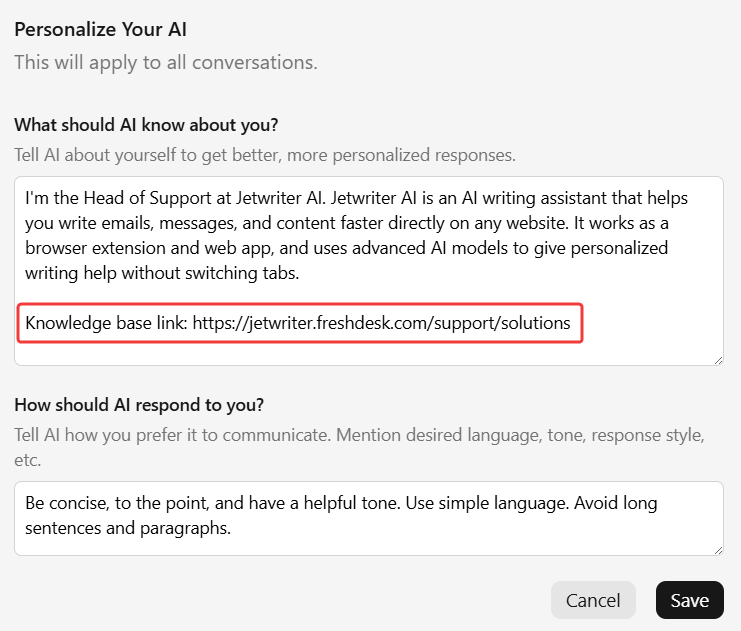
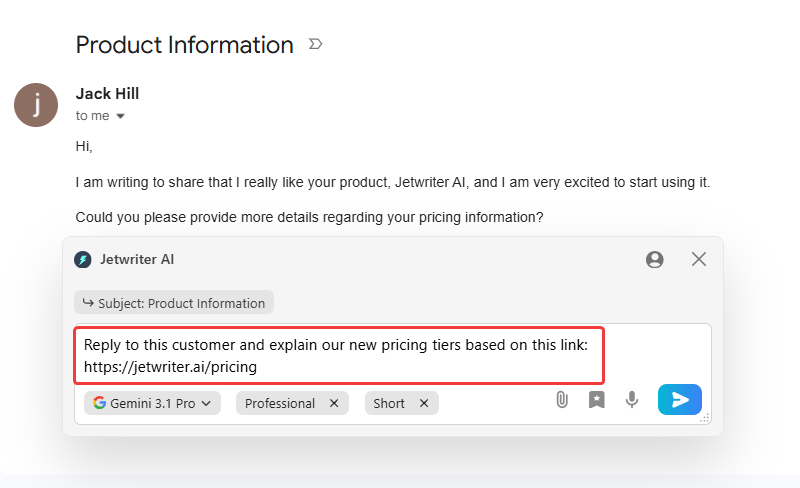
The Quick Way (In the Prompt): For one-off situations, paste a public link directly into your command prompt. For example, instruct the AI to: "Reply to this customer and explain our new pricing tiers based on this link: [Your URL]."
Using Live Web Search for Real-Time Answers
Jetwriter AI can access the live web to pull the latest facts and context for your drafts when internal knowledge isn't enough.
Rely on Automatic Web Search: Jetwriter AI is smart enough to automatically decide when it needs to search the web based on the context of your prompt to find real-time information.
Use Explicit Search Commands: You can explicitly tell the AI to search the web for specific information. For example, type "Search the web for the latest news about [Lead's Company] and write a personalized outreach email."
Reference Competitor Links: Ask the AI to read a specific URL to gather context. For example, type "Read this URL [Link to a competitor's product] and draft a polite email to my customer explaining why our features are better."
Conclusion
By utilizing your Gmail history, knowledge base URLs, and live web search, Jetwriter AI turns into a true expert on your company. It eliminates the need to hunt for facts and open new tabs, allowing you to quickly send perfectly accurate replies. It is a massive time-saver for support agents, founders, and anyone who needs to fire off precise responses effortlessly.
Was this article helpful?
That’s Great!
Thank you for your feedback
Sorry! We couldn't be helpful
Thank you for your feedback
Feedback sent
We appreciate your effort and will try to fix the article