Introduction
Writing an important email or document can be stressful, especially when you worry about small mistakes or finding the perfect words. Jetwriter AI is a simple tool designed to help you write clearly and confidently. This guide explains how to use its core features to fix grammar, summarize long texts, translate languages, and improve your everyday writing.
Instantly Fix Grammar and Spelling
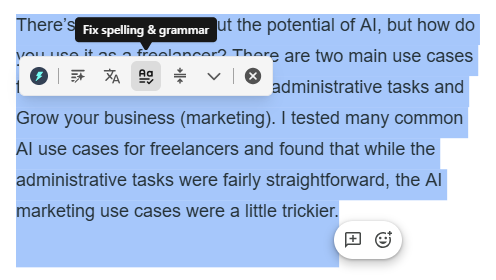
Jetwriter AI acts as a powerful proofreader that goes beyond a normal spell-checker to clean up your text.
Fix Mistakes: With one click, it finds and fixes spelling mistakes, tricky grammar problems, and punctuation errors.
For Students: Run your assignments through the tool to ensure you hand in polished, error-free work.
For Professionals and Job Seekers: Ensure your important reports, emails, resumes, and cover letters are completely professional and free of typos.
Understand Quicker with Summarize
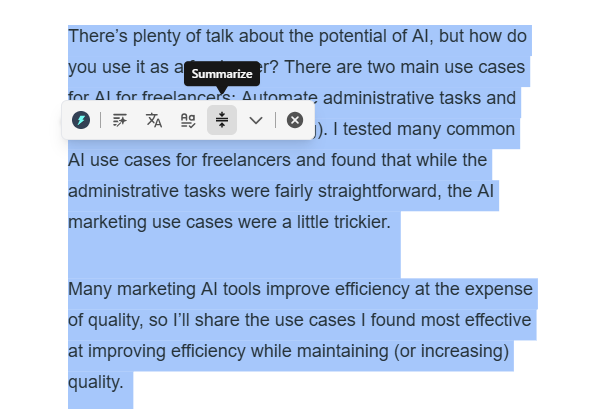
Save time by turning long, overwhelming documents into short, easy-to-read points.
Condense Long Texts: Take any long piece of text, like a boring report or a massive email chain, and ask Jetwriter AI to summarize it.
Get the Main Ideas: The tool quickly reads the whole text and gives you a short version with only the most important points.
Save Time: This is perfect for busy professionals catching up on emails, students reading research articles, or anyone wanting to read the news fast.
Make Your Writing Shine with "Improve Writing"
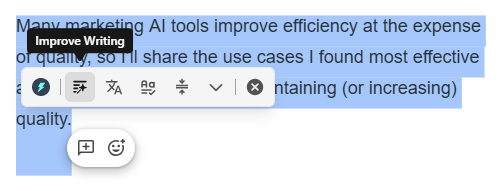
If your sentences sound boring or unclear, this feature acts like a creative coach.
Refine Your Words: Write down your thoughts, and Jetwriter AI will suggest better, clearer ways to say them.
Change the Tone: You can ask the tool to change the tone of your text, such as making a casual note sound more formal for your boss.
Communicate Clearly: This helps content creators make exciting posts, helps non-native speakers sound more natural, and helps team members give clear instructions.
Speak Any Language with Translate
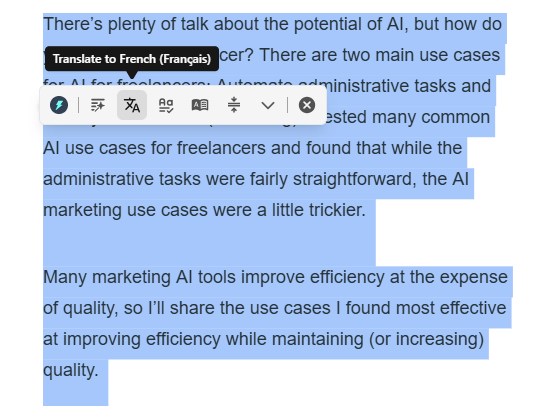
Break down language barriers by instantly translating your text.
Translate Instantly: Write something in English and instantly change it into Spanish, French, or dozens of other languages.
Read Foreign Text: If you receive a message you cannot read, Jetwriter AI can translate it back to your native language.
Connect Globally: Use this feature to email international customers, read foreign websites while traveling, or chat with family members who speak another language.
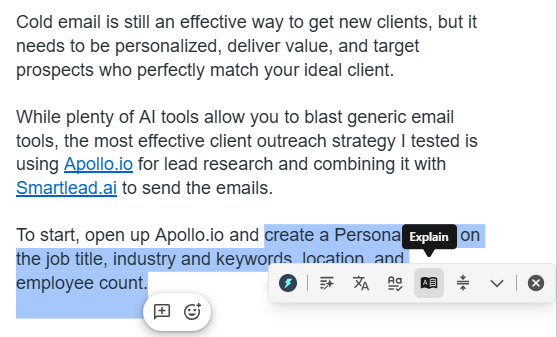
Explain Tough Stuff
Make hard-to-read text easy to understand by getting simple explanations.
Simplify Complex Ideas: Select any confusing paragraph, and Jetwriter AI will rewrite the complex ideas into simple terms that you can easily understand.
Learn New Topics: Use this feature when reading tricky technical documents, legal papers, or dense articles to quickly learn what they actually mean.
Save Time Reading: Stop reading the same hard sentence over and over. Get a fast, clear explanation and move on with your day.
Conclusion
Jetwriter AI is more than a simple writing tool. It is your personal helper for fixing grammar, saving time on long documents, and making your words sound amazing. By taking the stress out of writing, it allows anyone to share their ideas clearly and confidently. Try Jetwriter AI for free today to make your writing easier.
Was this article helpful?
That’s Great!
Thank you for your feedback
Sorry! We couldn't be helpful
Thank you for your feedback
Feedback sent
We appreciate your effort and will try to fix the article